Quarterly Submissions to HMRC via Making Tax Digital
Last modified:
As of 06/04/2026, certain people will be required to submit their tax returns electronically. This guide covers what Landlord Vision does in this regard.
What is supported
There are four stages of roll out:
Stage 1. UK property income (currently available)
Stage 2. Non-UK property income (currently available)
Stage 3. Self employment income
Stage 4. End of year summary including investment income (interest, dividends etc), pension income and more.
Only the information contained in stages 1 - 3 are required for the quarterly submissions. The other information is only required at the end of the year. You will be able to do both using Landlord Vision.
If you don't see what you are looking for just now, hang tight, it is coming.
How it works
Before you start, please make sure that you are registered for MTD with HMRC. You will not be able to complete the process in Landlord Vision until you have done this.
Go in to the MTD for Income Tax report and log in to your Government Gateway account. If you are registered for MTD, you should have one. You will then be taken to the MTD report itself where you can see your obligations, including what you have completed and what you still need to do.
If you are using the report for the first time, press the button Configure Linked Portfolios to assign this Government Gateway account to at least one contact from a portfolio.
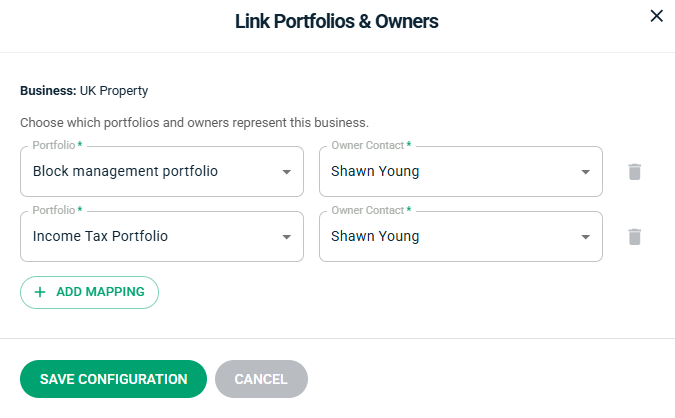
If you have UK Property, Foreign property and / or self employment income, you can submit these separately on the same report. Use the tabs below Quarterly Returns to set up the portfolio for each business that you need to submit data for.
Once done, the report will then aggregate all of the incomes and expenses by category for each of the portfolios that have been selected. Next review Business Details and ensure they are correct, particularly the Quarterly Period Type and the Accounting Basis. You can edit the linked portfolios here as well if you have set them incorrectly.
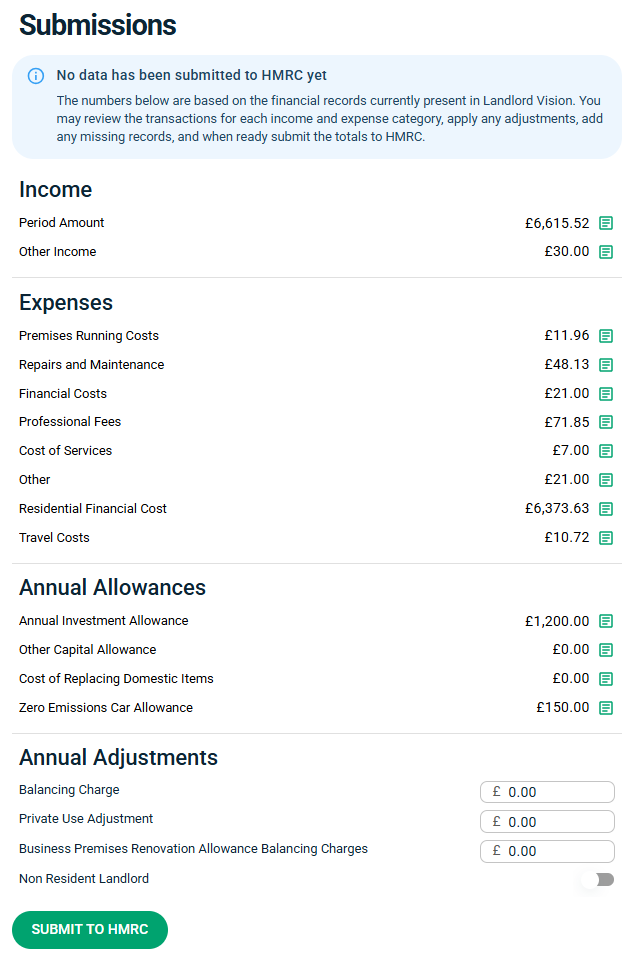
Press on the green square next to each of the submissions to see the data that makes up the totals. You can also see this data and export it on the Income Tax Report. If something is entered incorrectly, click on it from the list and you can edit it.
Once you are happy with the data, press Submit to HMRC to send the data off. You can do this multiple times within a declaration period, the new data will simply overwrite what was previously added.
Important notes
HMRC does not have access to your Landlord Vision data and can only see what you send them after you press the Submit button. However the data in Landlord Vision becomes the 'source of truth' if HMRC come asking questions at a later date. We recommend that you export the Income Tax Report once you have completed a submission so that you have a record of the data that was sent. This is a live software and things will change over time as you add more on.
Each submission within a quarterly period overwrites the previous one, so don't worry too much about the data being perfect, you can always update it later. What this also means is that you can get in to a regular habit of doing the submissions. So if you update Landlord Vision at the start of each month for example, once you have finished your updates you can submit the data to HMRC and keep it up to date that way. There is no maximum number of submissions and they are not cumulative, so submitting twice in one period does not double up your numbers.
