Non UK Properties in MTD
Last modified:
If you need to submit non UK properties to MTD, this guide covers it.
Firstly set up a portfolio for your non-UK properties.
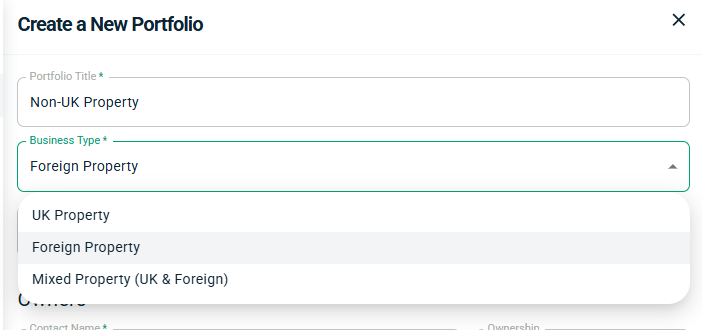
The Business Type will need to be either Foreign Property or Mixed Property (UK & Foreign). You can set a currency if you wish. If you do so, Landlord Vision will allow you to enter the values in the selected currency and will then back calculate the amount in pounds on that day for your tax return, If the currency you require is not on the list, let us know and we can add it for you.
Within the portfolio, set up your properties. Ensure that the Country is set.
Log in to the MTD for Income Tax report and under Quarterly Submissions select Foreign Property. Press Link Portfolios and Owners
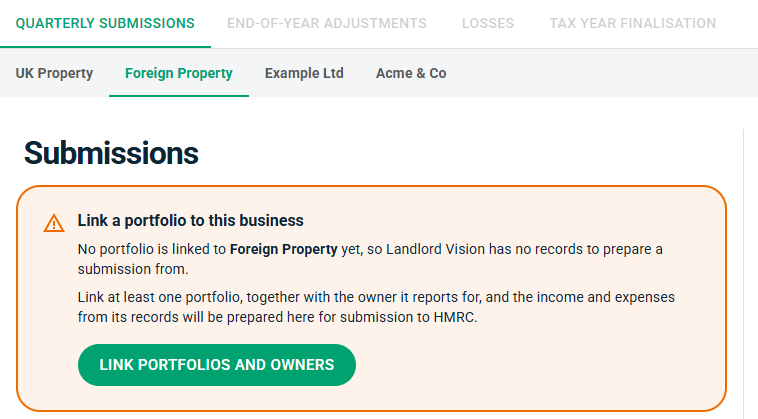
Select the portfolios that contain foreign properties and the owner that relates to the MTD Customer you are logged in as. Part of the National Insurance number will appear at the top of the screen if you aren't sure. Once done, confirm the quarterly period (Standard or Calendar) and whether you submit using cash or accurals.
Review your data and press Submit to HMRC when ready.
