Entering Tenancies that have Already Started
Last modified:
It is likely that when you start using Landlord Vision that you have a number of tenancies that are already in progress. Some of these tenancies may have been running for a long time and you don't want to record the old data in Landlord Vision when you already have it in another system. This guide covers how you can set a starting point for your data.
Remember, the tenancy should reflect what the tenant is supposed to pay and when. If your agent takes money off before paying you a nett amount, or if the tenant pays different amounts at different times, that is handled elsewhere. At this point you should be recording the schedule of what the tenant is actually supposed to be paying.
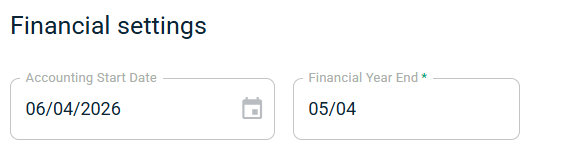
Firstly, decide what date you want to start tracking from. Most people tend use the start of a tax year, but you can start from today if you like. Or the beginning of the month, or next year. Enter this date in to the Financial Settings section of the Edit Portfolio screen.
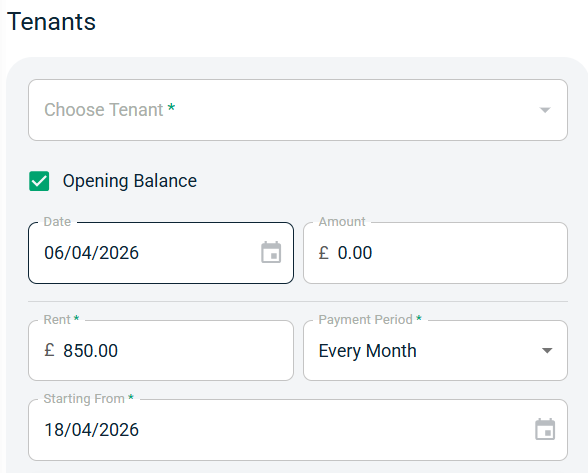
Next, set up your tenancies. Go to Tenancies and press the green + circle in the top right corner. The Add Tenancy screen appears. Fill in the details with the following considerations.
Start Date needs to be the date that the tenancy actually started
Opening Balance will become automatically ticked and your Opening Balance Date will be populated by the Accounting Start Date.
Amount is the balance that the tenant is carrying forward from your previous system. If they are in credit, enter a positive number and Landlord Vision will raise a credit note that you can apply to future rental invoices. If they are in arrears, enter a negative number and the software will raise an arrears invoice that you can allocate future payments to. If they are nether in arrears nor credit, do not enter anything in to this box.
Starting From is the date of the first invoice that will be raised in the system after the Opening Balance Date. You can change this if the tenant is due to pay on a different date.