White Labelling the Tenant Portal
Last modified:
Landlord Vision allows you to set up your own branding and make the Tenant Portal look like it is hosted on your domain rather than ours, so your tenants can remain completely in your ecosystem for anything that involves you.
There are two parts to this, both in Settings > Main > White Labelling
White Label Branding
Use this section to set up your log in screen and header logos. The log in screen appears at the top of the Tenant Portal log in screen and the Header logo appears within the portal and is smaller. Both can be the same logo if you wish. There is no set requirements for the resolution, but we recommend it is wider than it is is high.
Web Domain White Labelling
Enter your domain in to the Domain field and press Set Up. The Domain name should be in the format tenants.yourdomainname.com. You will then receive some items to add to your domain server. You will need to use the ones you are given by your software, the ones below are just an example. Copy and paste these in to the relevant place on your domain server.
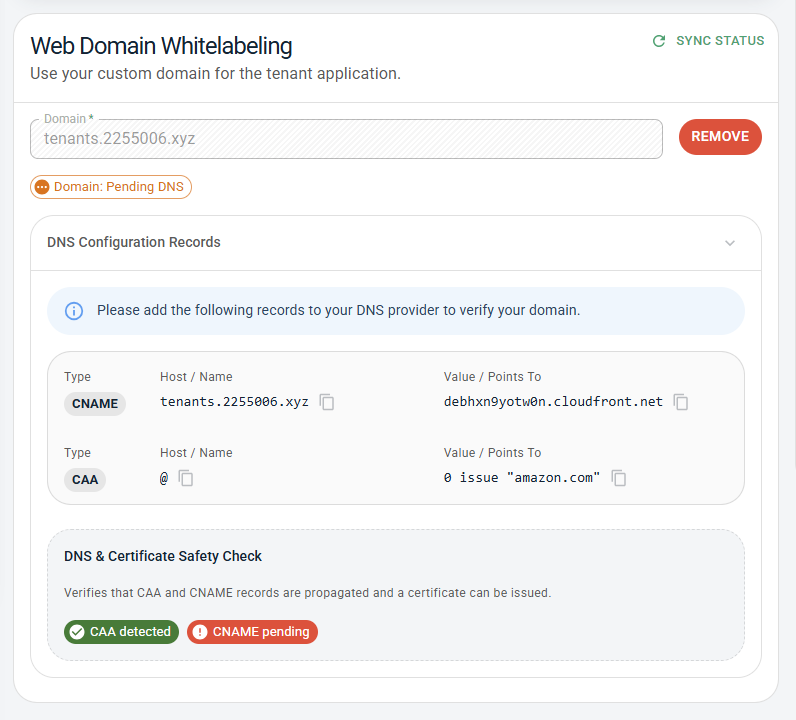
The verification process should take no more than about 30 minutes at which point the status will change to Active.
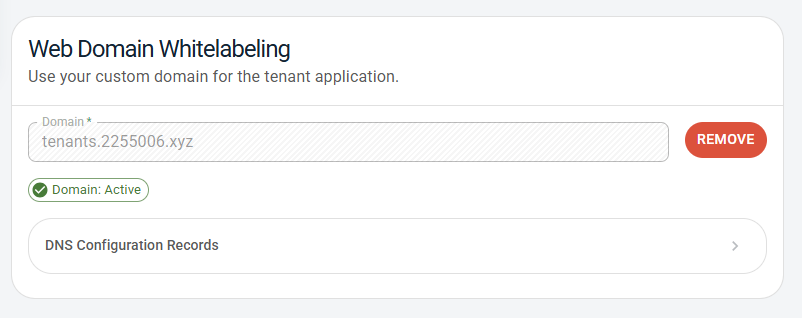
Once the domain is active, then it is ready to use. When the tenants log in to the portal, the URL will show as your domain rather than Landlord Vision.
