Collecting Rent from your Tenants by Direct Debit
Last modified:
Landlord Vision allows you to collect your payments via Direct Debit. This guide covers the process.
This service is provided by GoCardless. You can review their terms and conditions here:
Merchant agreement: https://gocardless.com/legal/merchants/
Payer terms: https://gocardless.com/legal/payer-terms/
Bacs Direct Debit Guarantee: https://gocardless.com/direct-debit/guarantee/
* Important note. The Direct Debit system uses the BACS payment processing system. Everything in BACS has a lead time of several days. We strongly recommend that you make any changes including setting up, inviting tenants and changing the rent as early as possible to give any changes time to propagate through. Leaving it late can lead to payments being collected after the desired date. There is a time line of payments at the bottom of this guide.
How it works
Use the rent schedule in Landlord Vision to set up Direct Debit mandates from each of your tenants. The DD system will collect payments from your tenant's bank account on the day the rent is due and pay it in to your bank account two working days later. The software will record the payments and the fees so all you need to do is reconcile the pay out in your bank account.
Getting Started
Firstly, you need to connect your Landlord Vision account to GoCardless.
Go to Banking > Accounts > + > Add Payment Gateway.
Pick the bank account that should receive the payments and click Connect.
If you have an existing GoCardless account, sign in to it at this point, otherwise you will need to set up a new one.
* Please note that you will need a separate GoCardless account for each portfolio that you wish to use this service in.
Setting up mandates
Each tenant has their own mandate and payments will be collected on the due date as per the payment schedule. There are different ways to request a mandate.
Contacts > open a tenant > Payment Methods tab > Request Direct Debit.
Add Tenancy form > tick the Auto-collect rent box for any tenant.
For existing tenancies, Edit Tenancy form > tick the Auto-collect rent box
The tenant will receive an email from GoCardless asking them to set up their end of the mandate. If their bank account requires additional people to approve the payment, they will need to set this up as well at this point. Once all of the approvals are complete, these will make their way back through BACS to Landlord Vision. This takes up to three working days at which point it will show in Landlord Vision and the mandate will be active and the first payment can be requested.
When the approvals are in progress, the yellow GoCardless icon will be faded out. When it is approved it will become a bold yellow. You can track the progress of the activation process in the Payment Methods tab in the contact.
Collecting payments
Payments are submitted to BACS three working days before the payment is due, or four working days for the first payment of a mandate. The repeating income will raise invoices eight days in advance so they are available in the event of long weekends extending the lead time. Your tenant will receive an email from GoCardless when the invoice is submitted to BACS telling them the amount and the date the payment will be collected on.
If an invoice has been raised before the mandate was set up, it will not be collected. If an invoice is raised after the mandate is set up but before approvals have come through, they will now be collected.
Payment Statuses
Payment in progress: the payment has been requested but has not been collected yet.
Collected: The payment has been collected from the tenant but has not yet been paid out, but no longer shows as outstanding.
Paid Out: The payment is in your bank account.
Failed: The payment has failed, usually do to lack of funds.
Cancelled: The payment was cancelled, either by you or the tenant.
Reconciling payments
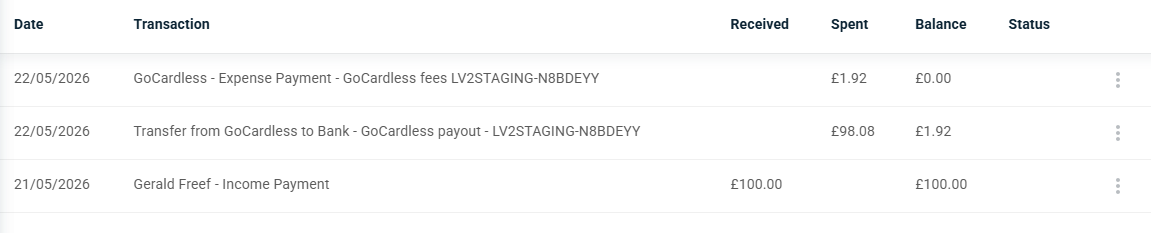
Landlord Vision will mark the relevant invoices as paid and will raise the fees in Expenses > Bills. All payments made, the fees and associated pay outs will appear in the GoCardless gateway account in Banking > Accounts. The pay outs (full amount collected minus fees) will also be written to the designated bank account and will be available to reconcile with the payment in the bank account the next time the feed updates.

Failed payments
If the payment fails, GoCardless will try three times to collect it. If they cannot collect it, you will receive an email from them stating this for you to follow up. You can retry the payment once the tenant has confirmed that funds are available or collect it by another means.
Timeline
Payments are submitted to BACS after the tenant has confirmed the Direct Debit at their end. It can take three days for the confirmation to come through
8 calendar days before due date: Invoice raised
Three working days before due date: Invoice submitted to BACS (this is four days for the first payment of a new mandate)
On the due date: Payment collected from tenant's bank account
Two working days after due date: Payment paid to your bank account
